Close Menu
  • Home
  • AI & Technology
  • Politics
  • Business
  • Cryptocurrency
  • Sports
  • Finance
  • Fitness
  • Gadgets
  • World
  • Marketing

Subscribe to Updates

Subscribe to our newsletter and never miss our latest news

Subscribe my Newsletter for New Posts & tips Let's stay updated!

What's Hot

Here Is What That Means For Users

April 20, 2026

The Best Gifts for Golfers of All Ages & Skill Levels 2026

April 20, 2026

This Surge Above $78,000 Should Not Be Trusted

April 20, 2026
Facebook X (Twitter) Instagram
  • Home
  • About US
  • Advertise
  • Contact US
  • DMCA
  • Privacy Policy
  • Terms & Conditions
Facebook X (Twitter) Instagram
MNK NewsMNK News
  • Home
  • AI & Technology
  • Politics
  • Business
  • Cryptocurrency
  • Sports
  • Finance
  • Fitness
  • Gadgets
  • World
  • Marketing
MNK NewsMNK News
Home » Google brings Gemini in Chrome to users in Australia, Japan, Singapore and South Korea
Gadgets

Google brings Gemini in Chrome to users in Australia, Japan, Singapore and South Korea

MNK NewsBy MNK NewsApril 20, 2026No Comments2 Mins Read
Facebook Twitter Pinterest LinkedIn Tumblr Email
Share
Facebook Twitter LinkedIn Pinterest Email


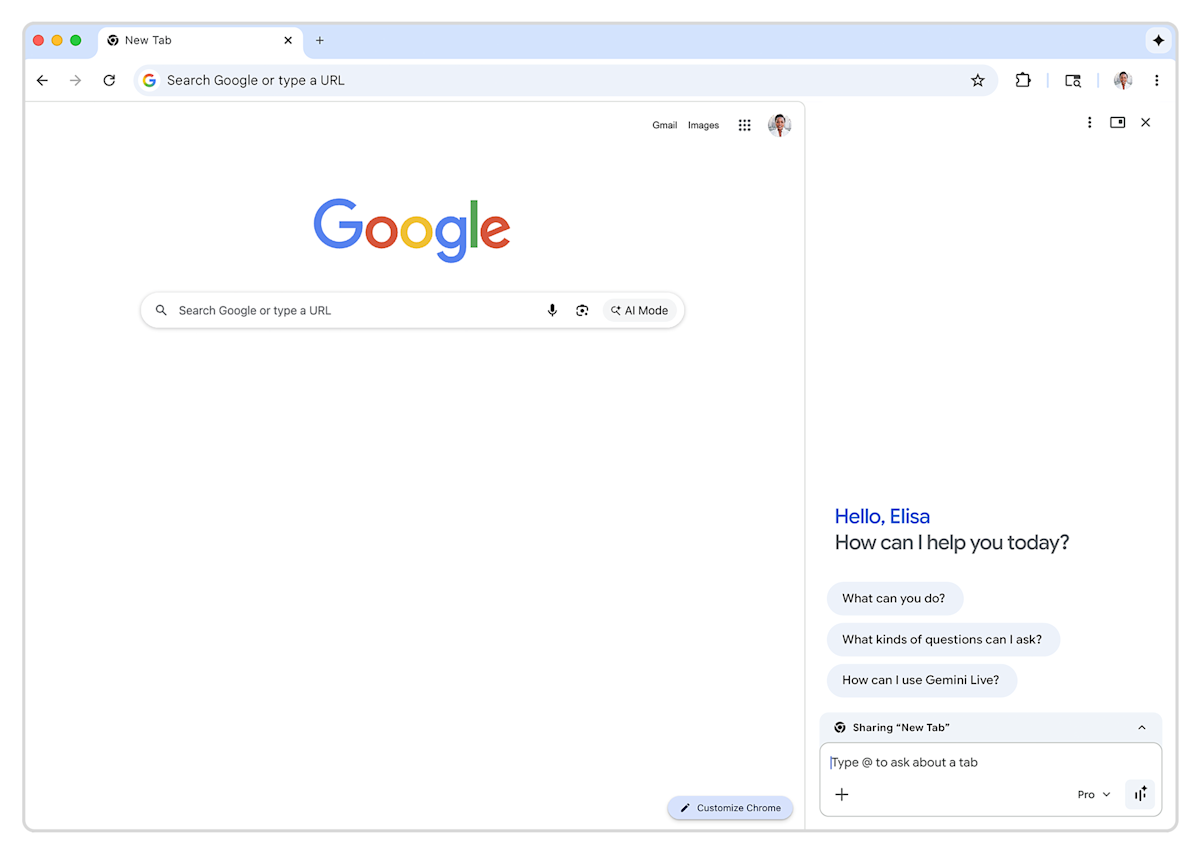
After debuting in the US, Gemini in Chrome is making its way to more markets. Starting today, Google is rolling out Chrome’s built-in chatbot to users in countries in East Asia and the Pacific, including Australia, Indonesia, Japan, the Philippines, Singapore, South Korea and Vietnam. The expansion comes after Google earlier this year made Gemini in Chrome available to people in Canada, India and New Zealand.

With the exception of Japan, where Google isn’t making the new suite available on iOS just yet, everyone else in the countries mentioned above can access Gemini in Chrome through Chrome’s desktop browser, and the app on their iPhone or iPad. To get started, just tap the “Ask Gemini” icon at the top right of the screen. It will open a new sidebar Google introduced at the start of the year where you can chat with Gemini across every open tab. From there, you can also access Google’s in-house image generator, Nano Banana 2. As you would expect, the suite offers integrations with Google’s other apps, allowing you, for instance, to add events to Calendar without leaving the interface.

If you don’t want to use Gemini, you can right click on the shortcut to unpin it from the top of the interface.  


Source link

Share. Facebook Twitter Pinterest LinkedIn Tumblr Email
MNK News
  • Website

Related Posts

Google brings Gemini in Chrome to users in Asia and the Pacific

April 20, 2026

John Ternus will be CEO of Apple when Tim Cook steps down this fall

April 20, 2026

Sony will require age checks in the UK and Ireland to access PlayStation communication features

April 20, 2026
Add A Comment
Leave A Reply Cancel Reply

Editors Picks

Sri Lanka’s Dasun Shanaka handed one-year PSL ban for IPL switch

April 20, 2026

Late bloomer Salman Mirza sets sights on 2027 World Cup

April 20, 2026

Kings slump to another defeat as Sultans trio star

April 19, 2026

Humanoid robots race past humans in Beijing half-marathon, showing rapid advances

April 19, 2026
Our Picks

Here Is What That Means For Users

April 20, 2026

This Surge Above $78,000 Should Not Be Trusted

April 20, 2026

Binance Top Traders Quietly Build Dogecoin Long Exposure

April 20, 2026

Recent Posts

  • Here Is What That Means For Users
  • The Best Gifts for Golfers of All Ages & Skill Levels 2026
  • This Surge Above $78,000 Should Not Be Trusted
  • Binance Top Traders Quietly Build Dogecoin Long Exposure
  • Best Non-Toxic Cookware & Appliances for Healthy Eating 2026

Recent Comments

No comments to show.
MNK News
Facebook X (Twitter) Instagram Pinterest Vimeo YouTube
  • Home
  • About US
  • Advertise
  • Contact US
  • DMCA
  • Privacy Policy
  • Terms & Conditions
© 2026 mnknews. Designed by mnknews.

Type above and press Enter to search. Press Esc to cancel.