



Google has quietly started accessing Gmail users’ private emails and attachments to train its AI models, requiring manual opt-out to avoid participation. To make the process even trickier, Gmail users have to opt out in two separate places for the change to work. Follow these steps to protect your privacy from Google’s invasive AI endeavors.
Malwarebytes reports that Google has recently implemented changes that enable Gmail to access all private messages and attachments for the purpose of training its AI models. This means that unless users take action to opt out, their emails could be analyzed to improve Google’s AI assistants, such as Smart Compose or AI-generated replies.
The motivation behind this change is Google’s push to enhance Gmail’s features with the company’s Gemini AI, aiming to help users write emails more efficiently and manage their inboxes more effectively. To accomplish this, Google is utilizing real email content, including attachments, to train and refine its AI models. These settings are now reportedly switched on by default, rather than requiring explicit opt-in consent.
As a result, if users do not manually disable these settings, their private messages may be used for AI training without their knowledge. While Google assures strong privacy measures are in place, such as data anonymization and security during the AI training process, those handling sensitive or confidential information may find little comfort in these promises.
To fully opt out of Gmail’s AI training, users must change settings in two separate locations. This article features a guide and images for opting out on desktop, but the selections are very similar if accessing Gmail via the mobile app.
First Opt Out: Turning Off “Smart Features in Gmail, Chat, and Meet”
Step 1: Click on the gear icon in the upper right of the Gmail window and select “See All Settings.”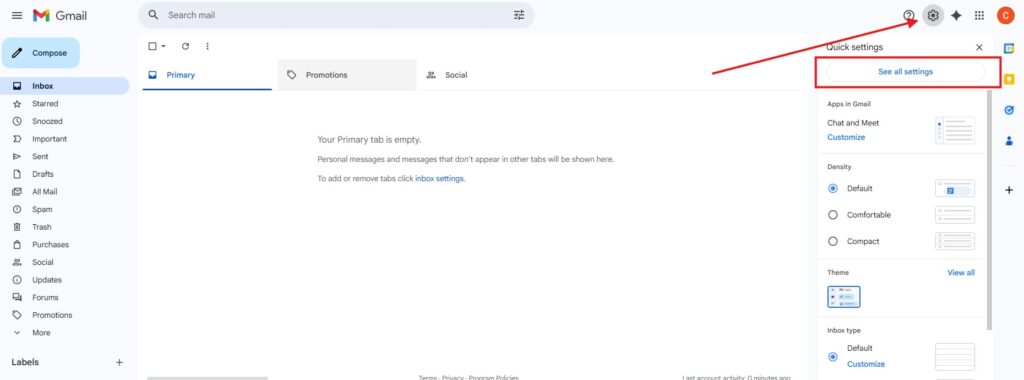
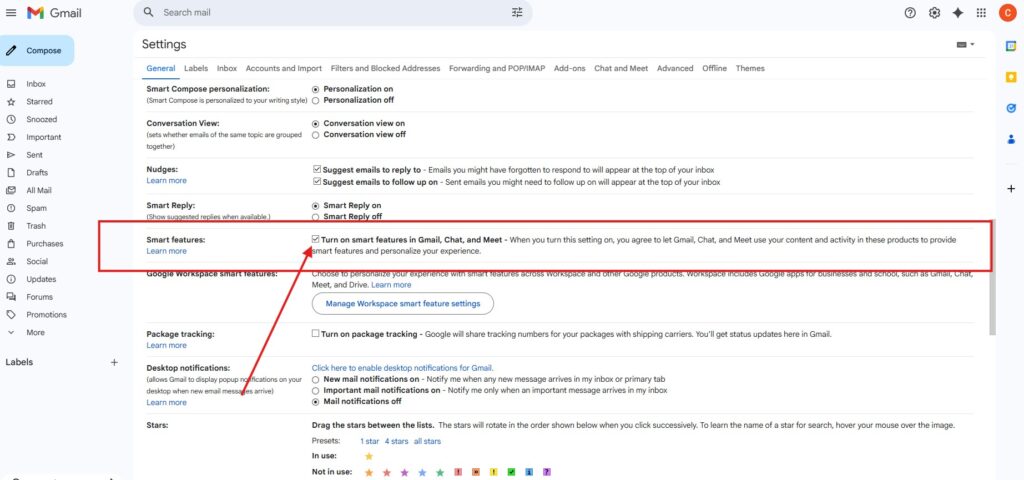
Step 2: Scroll down to “Smart features” which is about halfway down the long settings menu. Uncheck the “turn on smart features in Gmail, Chat, and Meet” box.
Step 3: You will be prompted to reload Gmail to turn off “Smart features.” After the site reloads, it’s a good idea to navigate through the menu again to confirm the feature is turned off.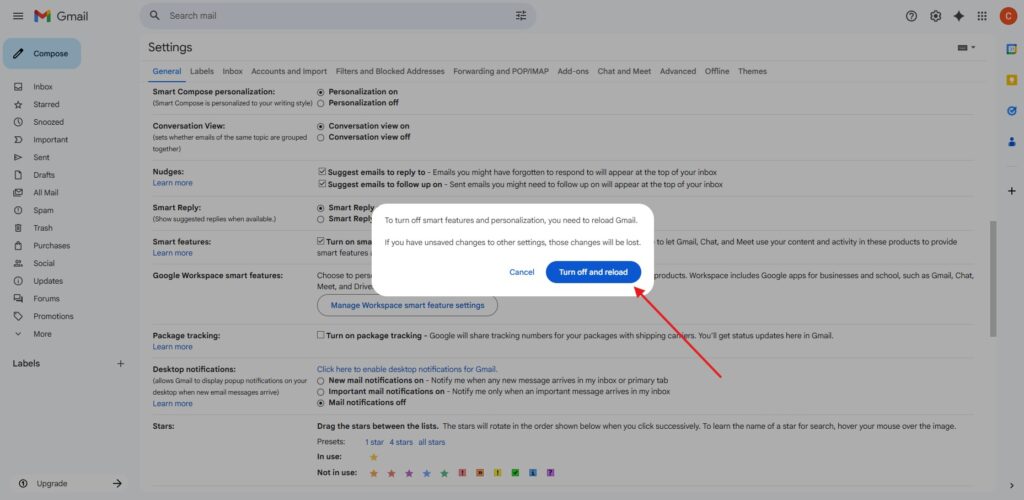
Once you have confirmed the opt out is successful, you can move on to Google’s second AI opt out.
Second Opt Out: Disabling “Google Workspace Smart Features”
Step 4: Within the same setting menu, find the “Google Workspace smart features” section, which is typically directly below the “Smart features” section you just worked on. click on “Manage Workspace smart feature settings.”

Step 5: Toggle off both options and hit save. Both “Smart features in Google Workspace” and “Smart features in other Google products” should show a gray “X” as shown in the image below, not a blue checkmark.

Once complete, doublecheck both opt outs to ensure everything is deactivated.
The rollout of this feature without clear, upfront consent has raised eyebrows among privacy advocates and security experts. By following these steps, you’ve taken the initiative to protect yourself and your loved ones from intrusive AI training practices.
Read more at Malwarebytes here.
Lucas Nolan is a reporter for Breitbart News covering issues of free speech and online censorship.
Colin Madine is the tech editor for Breitbart News.
