Close Menu
  • Home
  • AI & Technology
  • Politics
  • Business
  • Cryptocurrency
  • Sports
  • Finance
  • Fitness
  • Gadgets
  • World
  • Marketing

Subscribe to Updates

Subscribe to our newsletter and never miss our latest news

Subscribe my Newsletter for New Posts & tips Let's stay updated!

What's Hot

Movie tracking app Binge uses Apple’s Live Activities to warn about jump scares

April 7, 2026

Underdog Bitcoin Miner Bags 3.139 BTC In Stunning Block Discovery

April 7, 2026

‘NY Post Cast’ Host Caitlyn Becker: ‘Code Red’ Lays Out How to Prepare for AI Revolution

April 7, 2026
Facebook X (Twitter) Instagram
  • Home
  • About US
  • Advertise
  • Contact US
  • DMCA
  • Privacy Policy
  • Terms & Conditions
Facebook X (Twitter) Instagram
MNK NewsMNK News
  • Home
  • AI & Technology
  • Politics
  • Business
  • Cryptocurrency
  • Sports
  • Finance
  • Fitness
  • Gadgets
  • World
  • Marketing
MNK NewsMNK News
Home » Chrome finally adds support for vertical tabs.
Gadgets

Chrome finally adds support for vertical tabs.

MNK NewsBy MNK NewsApril 7, 2026No Comments2 Mins Read
Facebook Twitter Pinterest LinkedIn Tumblr Email
Share
Facebook Twitter LinkedIn Pinterest Email


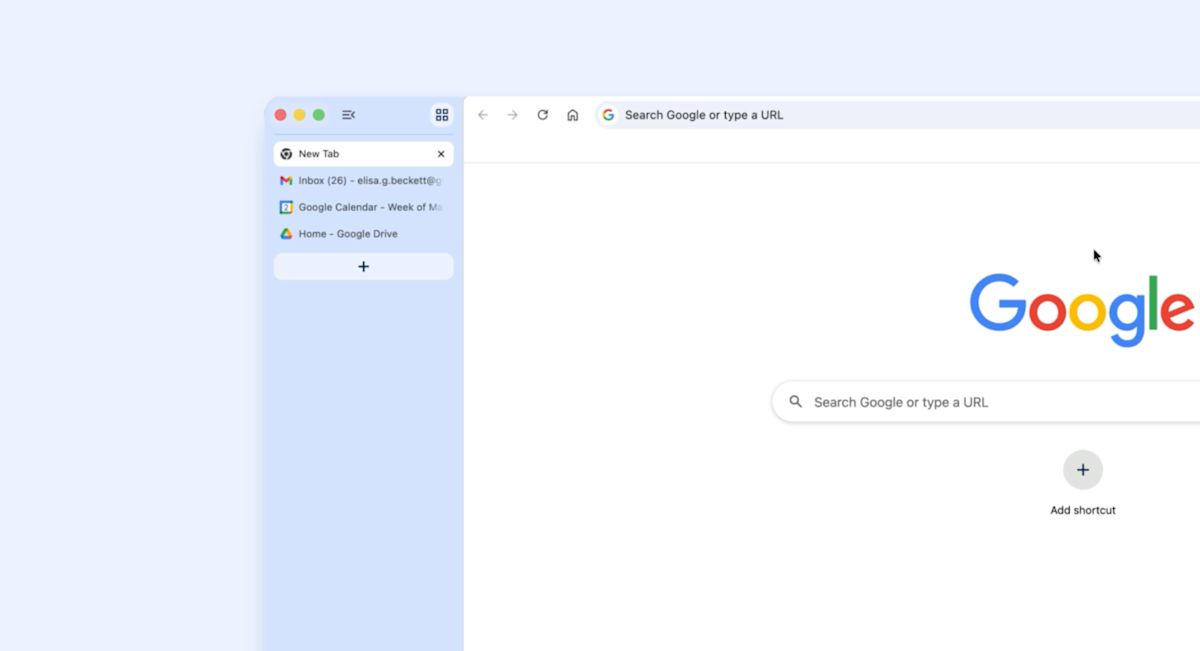
Google has started rolling out a small but significant update to Chrome on desktop. Starting today, users will begin seeing an option to organize their tabs vertically. To use the new feature, right click on any Chrome window and select “Show Tabs Vertically.”

Google is late to the game here. Before today, every other major browser but Chrome offered support for vertical tabs — though the quality of implementation varies widely. Firefox, for instance, has supported vertical tabs since its 136 update in March of last year, and in my experience, has one of the best interfaces for managing dozens of tabs. Apple’s own Safari is another browser with the option to stack tabs vertically, though things can quickly get confusing due to all the different ways you can group webpages.

Separately, Google is rolling out an enhanced reading mode that offers a new full-page interface. To use the feature, right click on a page and select “Open in reading mode.” As you might imagine, reading mode is designed to make busy webpages easier to get through without distraction. As with most Chrome upgrades, it may take a few days before today’s update rolls out to your device, so be patient if you don’t see it right away.  


Source link

Share. Facebook Twitter Pinterest LinkedIn Tumblr Email
MNK News
  • Website

Related Posts

Movie tracking app Binge uses Apple’s Live Activities to warn about jump scares

April 7, 2026

Google updates Gemini’s mental health safeguards

April 7, 2026

Xbox Game Pass additions for April include Hades 2 and Call of Duty: Modern Warfare

April 7, 2026
Add A Comment
Leave A Reply Cancel Reply

Editors Picks

Karachi Kings captain David Warner charged with drink-driving in Sydney: reports

April 7, 2026

Arbeloa expects Champions League response as Real host Bayern after La Liga setback

April 6, 2026

Pogacar clinches joint-record third Tour of Flanders

April 6, 2026

Nawaz spins Sultans to comfortable victory over Gladiators

April 5, 2026
Our Picks

Underdog Bitcoin Miner Bags 3.139 BTC In Stunning Block Discovery

April 7, 2026

Bitcoin Rainbow Chart Says Price Is Ranging Above $60,000 For A Reason, Here’s Why

April 7, 2026

XRP Price Will Trade At $1,000 If This Happens; Analyst

April 7, 2026

Recent Posts

  • Movie tracking app Binge uses Apple’s Live Activities to warn about jump scares
  • Underdog Bitcoin Miner Bags 3.139 BTC In Stunning Block Discovery
  • ‘NY Post Cast’ Host Caitlyn Becker: ‘Code Red’ Lays Out How to Prepare for AI Revolution
  • Google updates Gemini’s mental health safeguards
  • Flora Raises $5M to Build Fertility Insurance Category

Recent Comments

No comments to show.
MNK News
Facebook X (Twitter) Instagram Pinterest Vimeo YouTube
  • Home
  • About US
  • Advertise
  • Contact US
  • DMCA
  • Privacy Policy
  • Terms & Conditions
© 2026 mnknews. Designed by mnknews.

Type above and press Enter to search. Press Esc to cancel.