Close Menu
  • Home
  • AI & Technology
  • Politics
  • Business
  • Cryptocurrency
  • Sports
  • Finance
  • Fitness
  • Gadgets
  • World
  • Marketing

Subscribe to Updates

Subscribe to our newsletter and never miss our latest news

Subscribe my Newsletter for New Posts & tips Let's stay updated!

What's Hot

What to watch: Trump addresses the nation about the Iran war

April 1, 2026

The Bitcoin Bleed Is Almost Over, But Will Price Reach $40,000 Before Bouncing?

April 1, 2026

Exclusive — Joe Grogan: Microsoft Sold Out American Values to Score Points with ‘Washington Left’

April 1, 2026
Facebook X (Twitter) Instagram
  • Home
  • About US
  • Advertise
  • Contact US
  • DMCA
  • Privacy Policy
  • Terms & Conditions
Facebook X (Twitter) Instagram
MNK NewsMNK News
  • Home
  • AI & Technology
  • Politics
  • Business
  • Cryptocurrency
  • Sports
  • Finance
  • Fitness
  • Gadgets
  • World
  • Marketing
MNK NewsMNK News
Home » How to adjust the Liquid Glass effect in iOS 26.1
Gadgets

How to adjust the Liquid Glass effect in iOS 26.1

MNK NewsBy MNK NewsNovember 9, 2025No Comments2 Mins Read
Facebook Twitter Pinterest LinkedIn Tumblr Email
Share
Facebook Twitter LinkedIn Pinterest Email


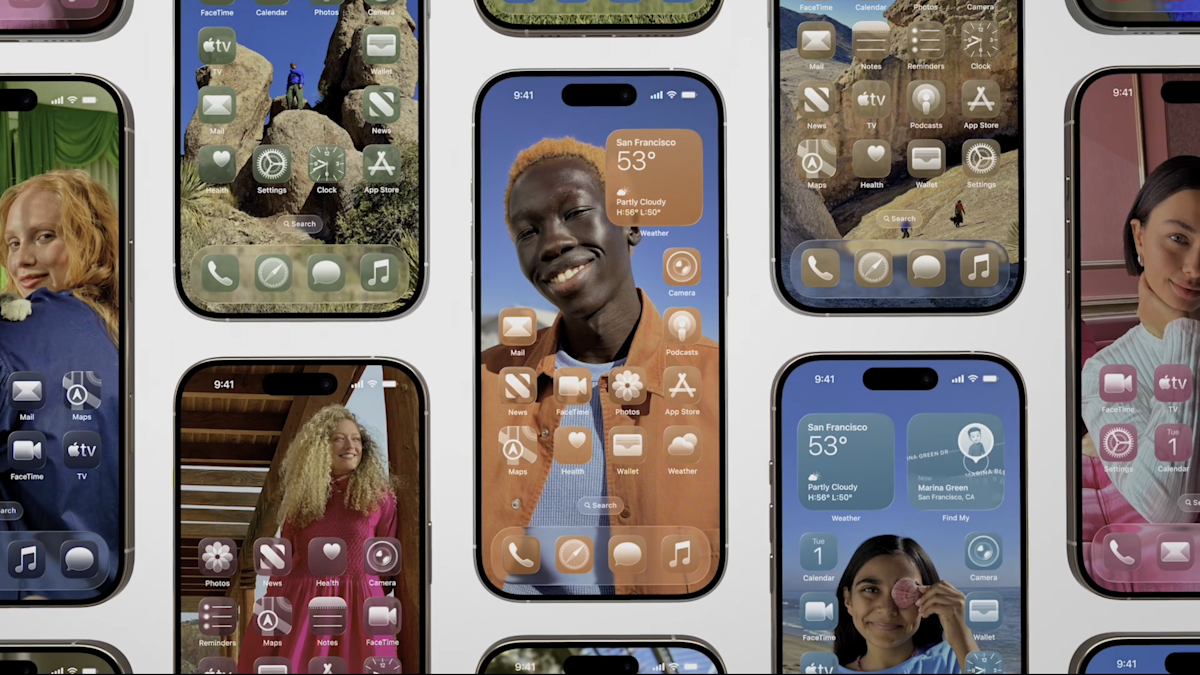
Apple’s latest iterative update for iPhones brings a welcome change for those who aren’t a fan of its Liquid Glass design overhaul. After user complaints that the Liquid Glass’ translucent design was hard to read, Apple introduced a compromise in iOS 26’s fourth beta that allowed for a more frosted look as well as a Reduce Transparency option buried in the Accessibility settings. Now, Apple is making this Liquid Glass toggle available for all iPhone users with iOS 26.1.

What is Liquid Glass?

Apple debuted Liquid Glass at WWDC 2025 as its major visual redesign, which prompted a lot of comparisons to Windows Vista. Everything from switches and sliders to sidebars and panels would imitate glass, so that users can see the underlying colors and content. While some iPhone users liked the fluidity and freshness, others said the transparent look often created legibility issues, caused lag from the animations and led to eye strain over extended periods of time.

How to reduce the Liquid Glass effect

To access the new Liquid Glass toggle, make sure your iPhone is updated to iOS 26.1. You can check which version you’re by navigating to Settings, then General, then Software Update. After you confirmed that you’re on the most recent iOS, you can go back into Settings, then Display & Brightness. From there, you’ll find a new setting for Liquid Glass that lets you choose between “Clear” or “Tinted.” The Clear option is Apple’s original vision for Liquid Glass with see-through controls, while the Tinted option “increases opacity and adds more contrast.”

You can preview the differences between the two choices in the Liquid Glass setting before you commit to one. When in use, the Tinted option switches to the same frosted look first seen by iOS beta testers, which adds a more solid background to panels that have been Liquid Glass-ified. It’s important to note that there are only two options and Apple didn’t instead opt for a slider to adjust opacity. However, Apple is leaning more into customizability with its operating systems, as indicated by its recently introduced Spatial Scenes feature.


Source link

Share. Facebook Twitter Pinterest LinkedIn Tumblr Email
MNK News
  • Website

Related Posts

Mr. Resident Evil signs a deal with Mr. Stellar Blade

April 1, 2026

The United app adds airport security wait times after lines return to normal

April 1, 2026

SpaceX has reportedly filed for the biggest IPO in history

April 1, 2026
Add A Comment
Leave A Reply Cancel Reply

Editors Picks

Spanish police open probe into anti-Muslim chants at friendly match with Egypt

April 1, 2026

Iraq seal FIFA World Cup return after 40 years; Turkiye end 24-year drought

April 1, 2026

Turkiye end 24-year FIFA World Cup drought with win over Kosovo

April 1, 2026

Iran will be at FIFA World Cup and play in US, says Infantino

April 1, 2026
Our Picks

The Bitcoin Bleed Is Almost Over, But Will Price Reach $40,000 Before Bouncing?

April 1, 2026

Pundit Reveals The 5 Phases To Know When The Bleed Has Ended

April 1, 2026

Bitcoin Below $54K Would Signal Best Accumulation Zone: Analyst

April 1, 2026

Recent Posts

  • What to watch: Trump addresses the nation about the Iran war
  • The Bitcoin Bleed Is Almost Over, But Will Price Reach $40,000 Before Bouncing?
  • Exclusive — Joe Grogan: Microsoft Sold Out American Values to Score Points with ‘Washington Left’
  • SHA Wellness Launches Scientific Advisory Board with Top Longevity Experts
  • Perplexity AI CEO Aravind Srinivas: AI Has ‘Glorious Future’ Because People Don’t Enjoy Their Jobs

Recent Comments

No comments to show.
MNK News
Facebook X (Twitter) Instagram Pinterest Vimeo YouTube
  • Home
  • About US
  • Advertise
  • Contact US
  • DMCA
  • Privacy Policy
  • Terms & Conditions
© 2026 mnknews. Designed by mnknews.

Type above and press Enter to search. Press Esc to cancel.